NuGet packages
Md3.Avalonia is split into 18 packages so an app can take the core controls it needs and add optional fonts, widgets, or third-party themes independently. All packages from a release use the same version.
Current preview:
0.5.0-preview.2. All 18 packages use this version. SeeMd3.Avaloniaon NuGet.org.
Install
Start with the core package. Add exactly one icon package only if the app uses the bundled Material Symbols catalog.
dotnet add package Md3.Avalonia --version 0.5.0-preview.2
dotnet add package Md3.Avalonia.Icons --version 0.5.0-preview.2
Add optional controls or a vendor theme only when the app uses them. Keep every Md3.Avalonia package on the same version. To test source changes directly, build a local feed from a repository checkout:
# In the library checkout: build all packages into a local feed.
bash scripts/build-nuget.sh --output "$HOME/.cache/md3-nuget"

# In your app project: restore from that feed.
dotnet add package Md3.Avalonia --source "$HOME/.cache/md3-nuget"
The release script builds all 18 packages and validates both .nupkg and .snupkg outputs. It requires the .NET 10 SDK, Java 17, and the .NET Android workload; see the repository build guide.
Package map
The core package is the base for Avalonia controls and most opt-in theme packages. Icons are an optional choice, and the Notifications package is independent of Avalonia UI.
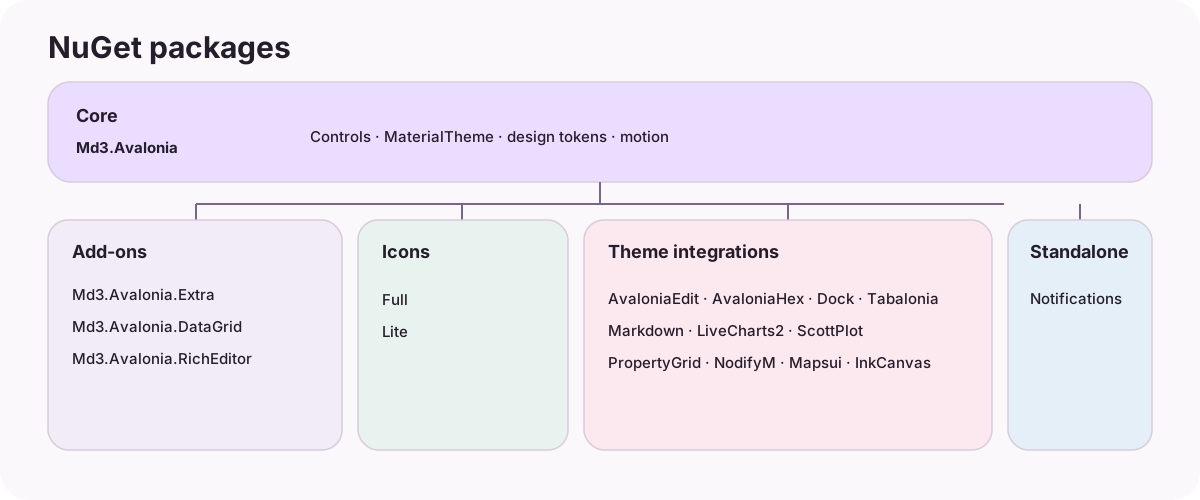
Core and general-purpose add-ons
| Package | Target frameworks | Use |
|---|---|---|
Md3.Avalonia |
net8.0, net10.0 |
Core controls, Material theme, dynamic color, motion, and platform adapters. Register MaterialTheme. |
Md3.Avalonia.Extra |
net8.0, net10.0 |
Optional controls and layouts such as MdWaterfall, MdFloatingWindow, and MdWaveform. Register ExtraTheme after MaterialTheme. |
Md3.Avalonia.Icons |
net8.0, net10.0 |
Full Material Symbols Rounded font and catalog. |
Md3.Avalonia.Icons.Lite |
net8.0, net10.0 |
Smaller Material Symbols font subset and catalog. Use instead of Icons when the full set is unnecessary. |
Md3.Avalonia.DataGrid |
net8.0, net10.0 |
Material theme for Avalonia DataGrid; register MaterialDataGridTheme. |
Md3.Avalonia.RichEditor |
net8.0, net10.0 |
Material theme for the maintained AvaloniaRichEditor fork; register MaterialRichEditorTheme. |
Third-party theme packages
These packages target net10.0 in the current source. Each is opt-in and is the only Md3.Avalonia package that brings its corresponding upstream component dependency; the core package does not acquire those dependencies.
| Package | Theme entry point | Integrates with |
|---|---|---|
Md3.Avalonia.AvaloniaEdit |
MaterialAvaloniaEditTheme |
AvaloniaEdit |
Md3.Avalonia.AvaloniaHex |
MaterialAvaloniaHexTheme |
AvaloniaHex |
Md3.Avalonia.Dock |
MaterialDockTheme |
Dock |
Md3.Avalonia.Tabalonia |
MaterialTabaloniaTheme |
Tabalonia |
Md3.Avalonia.Markdown |
MaterialMarkdownTheme |
Markdown.Avalonia; assign the style collection to the viewer. |
Md3.Avalonia.LiveCharts2 |
LiveCharts.Configure(settings => settings.AddMaterialTheme()) |
LiveCharts2 |
Md3.Avalonia.ScottPlot |
MaterialScottPlotTheme.Follow(plot) or .Apply(...) |
ScottPlot |
Md3.Avalonia.PropertyGrid |
MaterialPropertyGridTheme |
Avalonia.PropertyGrid |
Md3.Avalonia.NodifyM |
MaterialNodifyMTheme |
NodifyM |
Md3.Avalonia.Mapsui |
MaterialMapsuiTheme.Follow(mapView) or .Apply(...) |
Mapsui |
Md3.Avalonia.InkCanvas |
MaterialInkCanvasTheme and MdSignaturePad |
DotNetCampus.AvaloniaInkCanvas |
Most *Theme classes are added to Application.Styles after MaterialTheme. Markdown, LiveCharts2, ScottPlot, Mapsui, and InkCanvas have object-level or library-specific entry points; follow the linked API reference and the package README rather than registering them as ordinary global styles.
Platform service
| Package | Target frameworks | Use |
|---|---|---|
Md3.Avalonia.Notifications |
net8.0, net10.0, Windows-specific .NET 8/10 targets; net10.0-android is included by the release pack script. |
Native system notifications on Windows, macOS, Linux, and Android. It does not require the Material UI theme. |
Register optional styles
Add only the style packages your app uses. The XML namespaces below are examples; add the corresponding package references first.
<Application.Styles>
  <themes:MaterialTheme />
  <extra:ExtraTheme />
  <themes:MaterialDataGridTheme />
  <themes:MaterialRichEditorTheme />
  <themes:MaterialAvaloniaEditTheme />
</Application.Styles>
For the standalone control-first path, see the quick start. For working screens with screenshots and source snippets, see usage examples.