Project structure
This page explains where the library, optional packages, examples, tests, and generated documentation live. Consumer apps normally reference NuGet packages; the repository layout is useful when browsing source or contributing.
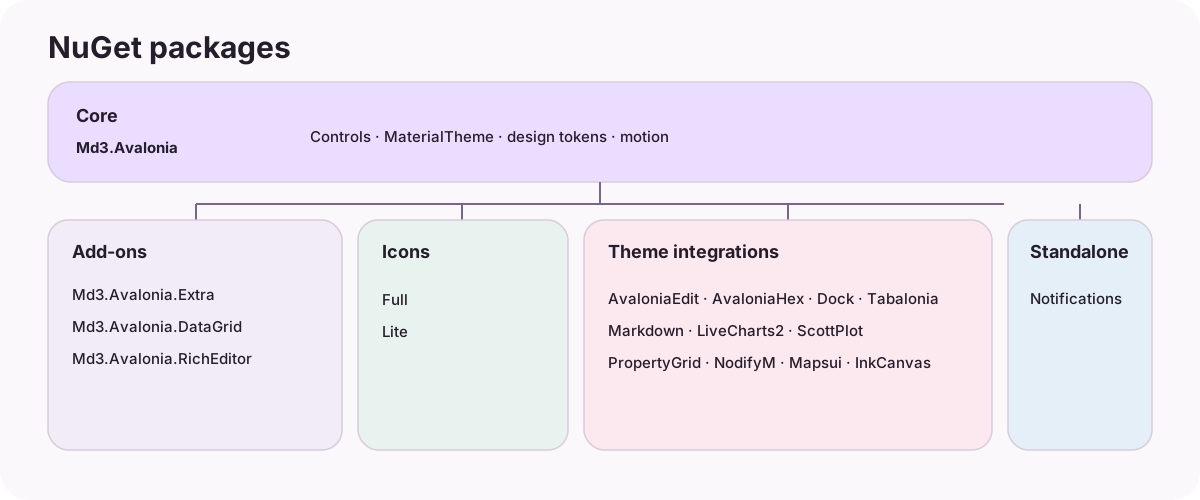
Repository map
Md3.Avalonia/
├─ src/
│  ├─ Md3.Avalonia/                  # Core controls, tokens, motion, localization, themes
│  ├─ Md3.Avalonia.Extra/            # Optional extra controls, layouts, and templates
│  ├─ Md3.Avalonia.Icons/            # Full Material Symbols font and glyph catalog
│  ├─ Md3.Avalonia.Icons.Lite/       # Reduced Material Symbols font and catalog
│  ├─ Md3.Avalonia.DataGrid/         # Avalonia DataGrid theme
│  ├─ Md3.Avalonia.RichEditor/       # AvaloniaRichEditor theme
│  ├─ Md3.Avalonia.AvaloniaEdit/     # AvaloniaEdit theme
│  ├─ Md3.Avalonia.AvaloniaHex/      # AvaloniaHex theme
│  ├─ Md3.Avalonia.Dock/             # Dock theme
│  ├─ Md3.Avalonia.Tabalonia/        # Tabalonia theme
│  ├─ Md3.Avalonia.Markdown/         # Markdown.Avalonia styles
│  ├─ Md3.Avalonia.LiveCharts2/      # LiveCharts2 theme/configuration
│  ├─ Md3.Avalonia.ScottPlot/        # ScottPlot theme
│  ├─ Md3.Avalonia.PropertyGrid/     # Avalonia.PropertyGrid theme
│  ├─ Md3.Avalonia.NodifyM/          # NodifyM theme
│  ├─ Md3.Avalonia.Mapsui/           # Mapsui theme
│  ├─ Md3.Avalonia.InkCanvas/        # InkCanvas theme and MdSignaturePad
│  └─ Md3.Avalonia.Notifications/    # Native notifications (standalone)
├─ gallery/
│  ├─ Md3.Avalonia.Gallery/          # Desktop component gallery and examples
│  ├─ Md3.Avalonia.Gallery.Desktop/  # Desktop application host
│  └─ Md3.Avalonia.Gallery.Android/  # Android single-view host
├─ tests/Md3.Avalonia.HeadlessTests/ # Headless API, behavior, theme, and rendering tests
├─ docs/                             # DocFX guides and selected reference images
├─ templates/material/               # Local Material 3 overrides for the DocFX Modern theme
├─ .docfx/                           # DocFX filters and metadata configuration
├─ scripts/                          # Build, packaging, validation, and coverage scripts
└─ spec-snapshot/                    # Pinned conformance baselines and verification policy
What belongs where
| Location | Responsibility |
|---|---|
src/Md3.Avalonia/Controls |
Public controls and contracts. |
src/Md3.Avalonia/Themes |
MaterialTheme, component styles, color/shape/type tokens, and dynamic-theme code. |
src/Md3.Avalonia/Motion |
Motion schemes, transitions, and animation helpers. |
src/Md3.Avalonia.<Package>/ |
Independent opt-in package projects; integration packages keep third-party dependencies out of the core package. |
gallery/ |
Runnable desktop and Android demonstrations; many code samples in this guide are taken from its pages. |
tests/ |
Headless regression tests for API behavior, rendering, themes, and interactions. |
docs/ and index.md |
Bilingual DocFX guides, navigation, and preview assets. |
templates/material/ |
Project-local CSS customization over DocFX Modern; no third-party Material theme is layered on top. |
scripts/ and .github/workflows/ |
Reproducible package builds, static checks, CI, and Pages deployment. |
How API documentation is generated
Each packable project emits an XML documentation file. docfx.json lists the 18 package projects, DocFX reads their compiled public API and XML comments, then builds the searchable API reference. This keeps member descriptions next to their C# declarations; this site adds task-oriented guides without copying the full API catalog into Markdown.
The local DocFX Modern customization is in templates/material/public/main.css. The documentation workflow builds the same configuration used for the published preview.
Useful commands
# Validate package and bilingual API-documentation coverage
python3 scripts/check-api-doc-coverage.py

# Build the desktop gallery
dotnet build gallery/Md3.Avalonia.Gallery.Desktop/Md3.Avalonia.Gallery.Desktop.csproj -c Release

# Run headless tests
dotnet test tests/Md3.Avalonia.HeadlessTests/Md3.Avalonia.HeadlessTests.csproj -c Release
The complete solution and release packaging may require the Android workload; see the repository README and compatibility guide.